
How to Register
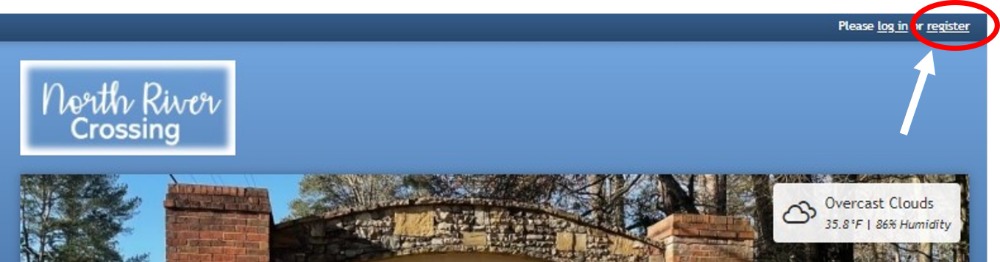
Stay in the loop and receive communications about NRC by registering on our new website. Get started by visiting our new website (www.northrivercrossing.org) and clicking on the "register" link displayed in the top right-hand corner.
Your information
Start by providing some basic information about yourself, like name, email address, and cell phone number. The email address you enter will be used with your password to form your login credentials.
Additional household members
If there are additional members you'd like to add to your account, you may add them in the "Additional Household Members" section.
Joint members that include an email address will be able to log in and receive communications.
Since an email address is required to log in, members that are added without an email address will not have the ability to log in or receive communications. However, they will be displayed on the directory pages.

Addresses
To represent all members that make up a community, there are different account types available for members to register with. We have two types of members that will have access to our NRC Website: (1) NRC Homeowners/NRC Swim & Tennis and (2) Outside swim & Tennis Members

Finishing up
Once you have submitted the registration form, your account will typically be placed in a review center for your website administrator to approve or decline. Once a decision has been made, you'll be notified via email.
Pages
- Home
- Find Us Here
- Calendar of Activities
- Homeowners Only
- How to join the NRC Website?
- Homeowner Directory
- Homeowner Directory Map
- Homeowner FAQ
- Membership Levels
- Board Members
- Contact NRC Board
- By-laws and Covenants
- 2020 By-laws and Covenants
- 2025 Amendment to By-laws
- 2025 Amendment to Covenants
- NRC Original Covenants
- Phase 1
- Phase 2
- Phase 3
- Phase 4
- Phase 5
- I want to volunteer my help!
- I want to host an Event!
- Contractor Recommendations
- Swim and Tennis Amenities
- Membership Overview
- Membership Inquiry
- Pool FAQ
- Contact Pool Committee
- Pool Pavilion Reservations
- Pool Pavilion Calendar
- Reserve My Court
- Peachtree Corners City Info
- PTC Community Contacts
- Local Schools
- Board Member Area
- Board Meeting Minutes
- Board Managed Documents
- Important Documents
- Facebook Group
- News Updates
- Real Estate FAQ
- Website Instructions
- How to Register
- Member & Account Settings
- Update Privacy Settings
- How to make an online payment
- Classifieds